The Player Hand is the strip along the bottom of the session screen that holds tiles only you can see. Other players see how many tiles you have but not which ones.
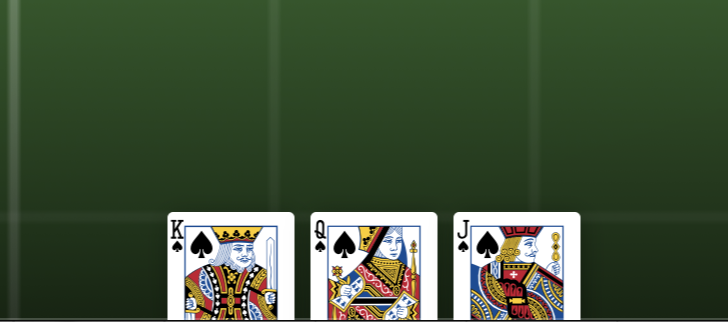
Enabling the hand
The hand is controlled in Table Settings. Open the Table tab and look for the Hand section.
- Hand toggle -- turns the hand on or off for the entire session. When off, none of the actions below are available.
- Max Hand Size -- the maximum number of tiles any single player can hold (default 5, up to 50).
Getting tiles into your hand
There are several ways to add tiles to your hand:
| Method | How |
|---|---|
| Take | Select a tile on the table, then press Take in the Action Dock. |
| Draw | Select a stack (deck), then press Draw. The top tile moves into your hand. |
| Deal | Select a stack, then press Deal to open the deal panel. Choose which players receive tiles and how many. |
| Drag | Drag a tile from the table into the hand area at the bottom of the screen. |
When your hand is full, these actions are blocked and you see an error message telling you the hand limit.
Only tiles, sleeves and stacks can go in a hand. A die, token, counter, timer or bag stays on the table: taking, drawing or dealing one into a hand, by hand, by a sequence step or by undo, is refused with a message saying what kind of piece it is (and, for a piece you picked, which one). A piece of another kind that was already in a hand before this rule can still be played out of it.
No hand can ever hold more than 50 pieces (a held stack counts as one), whatever puts them there. Max Hand Size decides what you can take or draw yourself; a pass, a seat change, an undo or a sequence step that would put a 51st piece in someone's hand is refused with a message saying so, and nothing moves.
A tile always enters your hand un-exhausted and upright, whatever state it was in on the table. Exhausting is a mark on a card in play, and a card in your hand is not in play. The same rule already applies to a card put back into a deck. Undo restores whatever the tile looked like on the table.
How big cards look in your hand
Cards in your hand are drawn at their real size, so a big card looks big and a small token looks small. Nothing is shrunk just for being large.
At rest a card is sunk below the bottom edge of the screen so only a strip of its top shows. Your hand never eats the table.
That strip always shows, whatever angle the card is at. A turned card is sunk by what it really paints at that angle, not by its upright height, so it can never end up below the line where you would be unable to see or grab it.
Hovering a card lifts it clear of the edge so you can see all of it. It does not magnify it. A card that was already at its real size is exactly the same size hovered as it was at rest, because it was already full size.
The hand only shrinks when the whole ROW stops fitting the width of the screen, and then every card shrinks by the same amount so cards never change size relative to each other. Hovering a card in a shrunken row gives it its real size back for as long as you are pointing at it. Past a point the shrinking stops and the hand fans cards out over one another instead.
Using tiles in your hand
Hover over a tile in your hand to lift it into view. From there you can:
- Drag to the table -- drag the tile upward out of the hand area and drop it anywhere on the table surface.
- Drag to a stack -- drag the tile onto a stack to add it on top.
- Double-click -- flips the tile between face-up and face-down.
- Right-click -- opens a context menu with actions for the tile.
- To Table -- select the tile and press To Table in the Action Dock (or choose Move to Table on its right-click menu) to put it back on the table in the middle of your view. A stack you are holding goes back the same way.
- Reorder -- drag a tile sideways within the hand to change its position. The tile moves the moment you let go, and it keeps its place: changing seats, passing a held stack, or another player taking a tile leaves the rest of your hand in the order you put it.
A tile you take, draw or are given goes to the right-hand end of your hand. A stack passed to you does the same. Every player's hand lane on the table shows that hand in the same order as its owner's hand.
When your hand is empty, a message reads "Your hand is empty" in place of the tiles.
Passing a stack to another player
When you are holding a whole stack in your hand, select it and press Pass Left or Pass Right in the Action Dock. The stack leaves your hand and arrives in a neighboring player's hand.
- The direction is a per-press choice. There are two actions, and each one names the way it sends the stack. Nothing has to be configured beforehand, and two players at the same table can pass different ways on the same turn.
- Only that stack moves. The rest of your hand stays with you, exactly as it was.
- The contents stay private. Only the player currently holding the stack can see what is in it, both before and after the pass. The player who sent it can no longer see its contents.
- Pass is unavailable when you are the only player seated, because there is no other seat to send the stack to.
- A pass into a hand that already holds 50 pieces is refused, and so is a pass to a seat that has no player space, since a hand is laid out from its player space.
- A pass is undoable. Undo returns the stack, with its tiles, to the player who sent it.
Which way Left and Right go
Left is clockwise around the table, and lands on the next seat in the seating order. Right is counterclockwise, and lands on the previous one. Unoccupied seats are not part of the ring, so a stack hops over an empty seat to the next player who is actually sitting there.
These are the same two directions everywhere they appear: the Pass Left and Pass Right actions, the Direction field on the Pass Stack step, and the Left Player and Right Player options that every seat-targeting step offers.
Opening a stack to the table
When you are holding a whole stack, select it and press Open in the Action Dock, or right-click it and choose Open, to make it readable by every seat while it stays in your hand. Press Close on the same stack to make it private again.
- What changes. An open stack stays yours -- it is still addressable only to your seat, and only you can take tiles out of it, draw from it, or pass it along. The one thing Open changes is who can READ its contents: with the flag set, every seat can see the tiles inside, not just you. This is the ONE verb that intentionally relaxes hand privacy; every other held-stack action either keeps a stack private or moves it between exactly the seats already entitled to see it.
- Why it exists. An open stack is how an open-information draft works: everyone at the table can see what is in a stack as it moves from hand to hand, the way an open draft in a physical game works face-up on the table.
- How it looks. An open stack shows a teal ring around it and an "OPEN" pill in its corner, in both the hand dock and on the table -- to you and to every other seat, so nobody has to guess whether a stack they are looking at is open.
- Toggling it is immediate and undoable. Open and Close each apply the instant you press them, with no confirmation step, and each is one undo entry that restores the flag to what it was.
- Only a stack you are holding can be toggled. The button is greyed out for a stack on the table, a stack in someone else's hand, or a locked stack -- see the gate described on the Action Dock page.
What happens to the open flag as a stack moves:
| Transition | What happens to the open flag |
|---|---|
| Dealt from a stack (Deal Stacks) | The new stack starts private, regardless of the source stack's flag. |
| Passed to a neighboring seat | The flag carries with the stack -- an open stack stays open for its new holder, a private one stays private. |
| Switched to a different seat (chair swap) | The flag carries with the stack, the same as a pass. |
| Released to the table | The flag is cleared. A table stack is always private by default; open/closed is meaningless once nobody is holding it. |
| Copied (duplicated) | The copy starts private. Duplicating only ever works on a table piece, and a table stack can never itself be flagged open. |
Leaving the table with cards in your hand
When you leave your seat, step back to watch, or the host removes you, your hand is put down on the table where your hand lane showed it, next to your player space: each card and each stack you were holding lands in its own place, in your hand order, showing the same face it had in your hand. A stack you were holding lands whole, in order and closed. Everyone at the table can then see and reach what you put down. Whatever you were dragging at the time is let go where it is.
Changing seats with cards in your hand
When you switch to an empty seat, your hand comes with you and keeps its order, after anything already in that seat's hand. When you swap seats with another player, the two hands trade places whole. Either is refused, with a message saying why, if it would put more than 50 pieces in a hand, or if the seat your hand would move to has no player space (choose a seat that has one, or put your cards on the table first).
When a seat's player space is removed
A hand is laid out from its seat's player space, so a hand only exists while that player space does. When the host lowers the number of players, any seat whose player space goes has its hand put down on the table first, where its hand lane showed it, the same way a player's leaving does. The same happens when an undo or redo removes a player space. An undo or redo that would remove the player space of a seat someone is sitting in is refused instead, just as the host cannot lower the number of players below a seated player. Nothing can put a piece in the hand of a seat that has no player space.
Undo and your hand
Undo and redo go by player, not by seat number, because players can sit down, leave, or change seats between an action and its undo.
Undo and redo put back only what the action itself changed. Anything that changed on its own since, such as a card renamed or given new art when its game was updated, or a piece that became a plain box when its custom shape was removed, stays as it is now.
- Only you can undo your own actions, in whatever seat you sit in now. Someone who later sits down in the seat you left cannot undo or redo what you did there. Actions an automation took can be undone by anyone.
- A card that undo puts back into your hand comes back to you, in the seat you sit in now. If that would put more than 50 pieces in your hand, the undo is refused and nothing moves.
- If you have left the table, a card that undo would put back into your hand goes on the table instead, the same way your leaving put the rest of your hand there. Whoever sits in your old seat never receives it.
- A hand needs its seat's player space, so an undo or redo that would put a card back into the hand of a seat with no player space, or lay a departed player's card down from such a seat's hand lane, is refused with a message saying so, and nothing moves.
- Actions taken before this rule existed do not record who took them or whose hand their cards were in. Undo cannot be used on those, and undo or redo refuses, with a message saying why, when it would put one of their cards back into a hand. Nothing moves and no hidden card is shown.
What other players see
Other players cannot see which tiles are in your hand. They only see a count of how many tiles you hold, shown as a small number next to your name in the Players Panel.
Everything inside a stack or sleeve you are holding is as private as a tile in your hand, however deep it sits: a card in a sleeve you hold, and a card in a sleeve inside a stack you hold, are hidden from every other seat and from spectators. Only you can act on them: another player cannot flip, turn, move or take a card that is inside a stack or sleeve in your hand, even one they saw on the table earlier. An open stack shows everything inside it, sleeves included.
When you pick up, pass, open, close or put down a stack or sleeve, or move a stack into or out of a private space, every other player's table shows or hides its cards straight away, and the same happens when you undo or redo it. Their table does not reload to catch up.
The table host can enable optional hand interactions in Table Settings under the Preferences tab:
| Setting | What it allows |
|---|---|
| Revealed Hands | The table is open-handed: every seated player sees every other player's hand contents, face up in the hand lane and from the Players Panel. |
| Allow Looking At Other Hands | Players can inspect (read-only) another player's hand contents. |
| Allow Searching Other Hands And Taking A Tile | Players can browse another player's hand and take a specific tile. They can also delete a tile or stack in another player's hand lane, and take a tile from it, from its right-click menu. Editing one also needs Revealed Hands, so that they can see what they are editing. |
| Allow Taking A Random Tile From Other Hands | Players can blindly take one random tile from another player's hand. |
All of these are off by default. Turning on Revealed Hands also turns on Allow Looking At Other Hands, because an open hand is already readable. Spectators never see hand contents, whatever these settings say. When enabled, other players interact with your hand through the hand count button in the Players Panel. These interactions are announced to the table so everyone knows when someone looks at or takes from a hand.
Hand Lane
The Hand Lane is a separate, optional feature that places a visible drop zone near each player's space on the table surface. It is independent of the Player Hand at the bottom of the screen.
Enable it in Table Settings under the Table tab. It requires both Player Spaces and Hand to be turned on. The Hand Lane Height setting controls the depth of each lane, in the table's units, at least 10 mm (0.4 in, 1 cm).
Each lane fans its player's hand out in that player's hand order, with no gaps. Moving or resizing a player space, or changing the lane height, moves the lane and its tiles with it straight away. A held stack takes one place in the lane, drawn at the same width whatever it holds, so the lane never shows how many cards are in another player's stack.
A tile in another player's lane is theirs. You cannot drag it, and double-clicking it does nothing. Its right-click menu offers only what you may do to it:
- Look shows it as you can see it, which is its back unless the table has Revealed Hands on. Peek is there too where the table allows peeking at it.
- At a table with Allow Searching Other Hands And Taking A Tile on, the menu also offers Take and Delete. Take puts the tile straight into your hand.
- Edit is offered only when you can see the tile, which is when the table also has Revealed Hands on. You cannot edit what you see only the back of. The same goes for a stack in another player's lane, unless it is open.
Keyboard shortcuts work the same way. A key for something you may not do to the tile, such as Flip or Rotate, shows "This is held in another player's hand. Only its holder can move it or reach into it." and changes nothing.