This section describes where everything is in a Playtest Parlor session and what each area does. It is reference material, not a tutorial. If you are new to the app, start with Getting Started and come back here when you need to look something up.
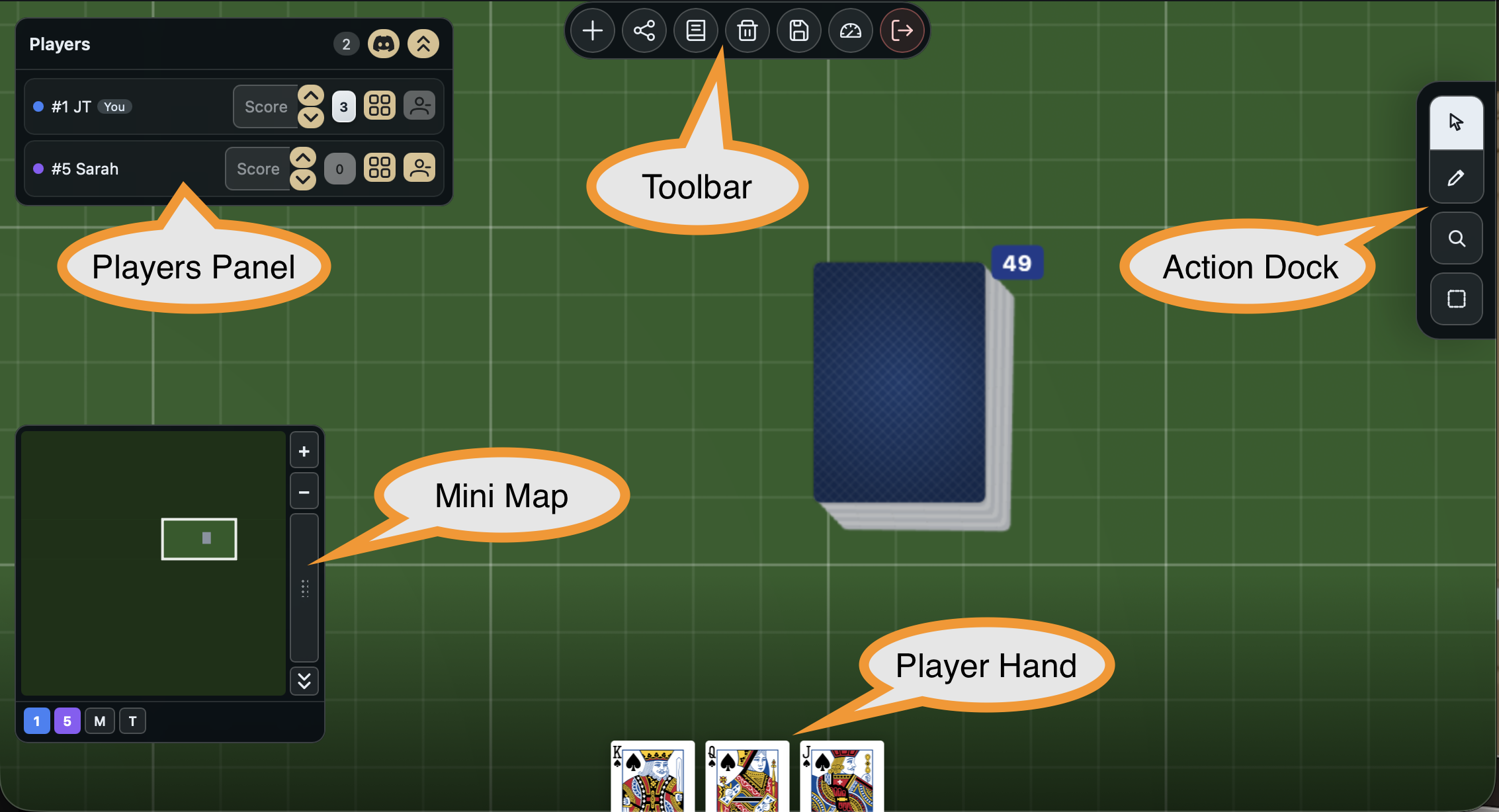
Areas of the session screen
- The Table -- the main play surface where pieces and spaces live.
- The Toolbar -- the top control strip for tool selection and table-level actions.
- The Players Panel -- the seated players list with presence, hands, and voice indicators.
- The Action Dock -- the context-sensitive action bar for whatever you have selected.
- The Player Hand -- the personal hand area along the bottom where you hold tiles privately.
- The Minimap -- the overview widget for seeing and jumping around the whole table.
Panels and dialogs
These are surfaces the toolbar or other areas open on top of the session. Each one has its own reference page:
- The Entity Browser -- the panel for adding new pieces and editing existing ones.
- The Session Notebook -- the shared notepad for capturing observations during play.
- The Sequences Panel -- the panel for building and debugging automated sequences.
- The Discord Panel -- connecting your Discord identity for voice channels.
Gameplay settings
Table-level behaviour a host turns on for a session, configured from Table Settings:
- Turn Tracking -- tracks whose turn it is and shows it to every seat.